
Integrating BaseCRM with a Static S3 website
I love BaseCRM! It’s been my go to CRM for some years now, and when I decided to start my own AWS consulting and managed services business, I knew exactly which CRM tool I was going to use.
One thing I needed was an easy way to capture lead data from my static website which I’m hosting via the Simple Storage Service (S3) and delivering content via CloudFront. If you’re a regular reader, you know that one of my goals for 2017 is to shut down as many OS’ as I can, so I decided the integration of my S3 website with BaseCRM would serve as an excellent example of what is possible.
API Gateway
Since my site is served via S3 and CloudFront I can’t execute any code - there are no servers, remember. Instead, I’m using the API gateway as the “front door” for the other application components. I won’t lie to you, setting up the API Gateway took a bit of work, but once I figured out the issues (mostly on the JS client-side), everything came together smoothly.
JS Snippet
Here’s the AJAX call I made in my JS code to tie the website to the API gateway. I ran into trouble with line 32. Even when I defined the data in line 33, I still required the additional content-type definition on line 32. If I didn’t include both the API Gateway would return a “415 Unsupported Media type” error.
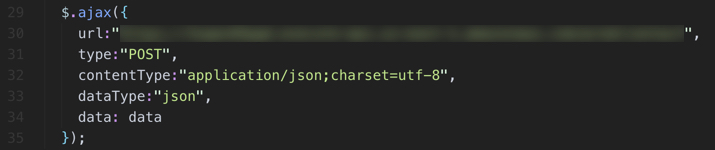
One quick tip: make sure that you enable CloudWatch Logs for your APIs without it troubleshooting is nearly impossible.
Step Functions
Last week I talked about a local AWS hackathon I attended and the frustration we had with AWS Step Functions. I decided then I would figure out how to use them and for this project it made sense to use Step Functions - great opportunity to learn! Not nearly as difficult as we originally thought. The hardest part was figuring out how to integrate them with the API gateway.
Here’s a screenshot of how I configured the “Integration Request” execution to invoke a Lambda Step Function.

I also had to create a “Body Mapping Template” to invoke the Lambda Step Function.
I’ve included the configuration I ended up using below - I’m passing input information from the AJAX script and I had to use a dynamically generated value for “name”, otherwise Lambda would return an error stating that the function was already running.

Once that was solved I needed to update the it came down to troubleshooting the Lambda functions that were called via the Step Functions.
Like the API Gateway, it’s super important to make sure you’ve enabled CloudWatch Logs for your Lambda functions.
Lambda
I ended up using two Lambda functions, executed in parallel, in this project, both executed via a Step Function. The first function creates the lead in BaseCRM using their API; the other generates an email notification to me via the Simple Email Service (SES). Both Lambda functions are written in Python and use the Boto3 SDK.

CreateLeadInBase
BaseCRM has a fantastic API that is super easy to use. I needed to base authentication information to the BaseCRM service, so I used Lambda variables to get this done. Super easy to setup and easy to maintain because of the Step Function capability I discussed earlier - simple scripts are easier to maintain!
SendEmailViaSES
Another super simple Python script. I setup the Simple Email Service (SES), verified my domain and that was pretty much it. Added the Python script and emails were generated.
BaseCRM API
If you’re using BaseCRM make sure that you check out their API; I mentioned in the last section it’s super easy to use and it allows you to quickly extends the functionality of BaseCRM or adds automation where you need it.
Here’s a diagram of how all the components ended up coming together.

One last thing, after you have made changes to your API configuration, make sure you deploy the new version!
There you have it. How I integrated BaseCRM with my static S3 website. Overall, a fairly straightforward process - the tough part being the Javascript work.